

|
|
RobotConfigIn |
|
|
Motors |
|
|
RightDrivePrimary |
|
|
CAN Address |
|
|
Invert |
|
|
InvertSensor |
|
|
Unit Conversion Factor |
|
|
Brake Mode |
|
|
Reverse Limt Switch Mode |
|
|
Forward Limt Swith Mode |
|
|
PWM Channel PWM Channel specifies the channel you want to use for the motor controller. Select a value from PWM 0 to PWM 9 or from PWM MXP 0 to PWM MXP 9. The default is PWM 0. If PWM Channel is Invalid, this VI returns an error. |
|
|
Motor Controller Type |
|
|
Peak Current (A) |
|
|
Continuous Current (A) |
|
|
Peak Duration (ms) |
|
|
Current Limit Enable |
|
|
RightDriveSecondary |
|
|
CAN Address |
|
|
Invert |
|
|
InvertSensor |
|
|
Unit Conversion Factor |
|
|
Brake Mode |
|
|
Reverse Limt Switch Mode |
|
|
Forward Limt Swith Mode |
|
|
PWM Channel PWM Channel specifies the channel you want to use for the motor controller. Select a value from PWM 0 to PWM 9 or from PWM MXP 0 to PWM MXP 9. The default is PWM 0. If PWM Channel is Invalid, this VI returns an error. |
|
|
Motor Controller Type |
|
|
Peak Current (A) |
|
|
Continuous Current (A) |
|
|
Peak Duration (ms) |
|
|
Current Limit Enable |
|
|
LeftDrivePrimary |
|
|
CAN Address |
|
|
Invert |
|
|
InvertSensor |
|
|
Unit Conversion Factor |
|
|
Brake Mode |
|
|
Reverse Limt Switch Mode |
|
|
Forward Limt Swith Mode |
|
|
PWM Channel PWM Channel specifies the channel you want to use for the motor controller. Select a value from PWM 0 to PWM 9 or from PWM MXP 0 to PWM MXP 9. The default is PWM 0. If PWM Channel is Invalid, this VI returns an error. |
|
|
Motor Controller Type |
|
|
Peak Current (A) |
|
|
Continuous Current (A) |
|
|
Peak Duration (ms) |
|
|
Current Limit Enable |
|
|
LeftDriveSecondary |
|
|
CAN Address |
|
|
Invert |
|
|
InvertSensor |
|
|
Unit Conversion Factor |
|
|
Brake Mode |
|
|
Reverse Limt Switch Mode |
|
|
Forward Limt Swith Mode |
|
|
PWM Channel PWM Channel specifies the channel you want to use for the motor controller. Select a value from PWM 0 to PWM 9 or from PWM MXP 0 to PWM MXP 9. The default is PWM 0. If PWM Channel is Invalid, this VI returns an error. |
|
|
Motor Controller Type |
|
|
Peak Current (A) |
|
|
Continuous Current (A) |
|
|
Peak Duration (ms) |
|
|
Current Limit Enable |
|
|
RightShooter |
|
|
CAN Address |
|
|
Invert |
|
|
InvertSensor |
|
|
Unit Conversion Factor |
|
|
Brake Mode |
|
|
Reverse Limt Switch Mode |
|
|
Forward Limt Swith Mode |
|
|
PWM Channel PWM Channel specifies the channel you want to use for the motor controller. Select a value from PWM 0 to PWM 9 or from PWM MXP 0 to PWM MXP 9. The default is PWM 0. If PWM Channel is Invalid, this VI returns an error. |
|
|
Motor Controller Type |
|
|
Peak Current (A) |
|
|
Continuous Current (A) |
|
|
Peak Duration (ms) |
|
|
Current Limit Enable |
|
|
LeftShooter |
|
|
CAN Address |
|
|
Invert |
|
|
InvertSensor |
|
|
Unit Conversion Factor |
|
|
Brake Mode |
|
|
Reverse Limt Switch Mode |
|
|
Forward Limt Swith Mode |
|
|
PWM Channel PWM Channel specifies the channel you want to use for the motor controller. Select a value from PWM 0 to PWM 9 or from PWM MXP 0 to PWM MXP 9. The default is PWM 0. If PWM Channel is Invalid, this VI returns an error. |
|
|
Motor Controller Type |
|
|
Peak Current (A) |
|
|
Continuous Current (A) |
|
|
Peak Duration (ms) |
|
|
Current Limit Enable |
|
|
ShooterRotate |
|
|
CAN Address |
|
|
Invert |
|
|
InvertSensor |
|
|
Unit Conversion Factor |
|
|
Brake Mode |
|
|
Reverse Limt Switch Mode |
|
|
Forward Limt Swith Mode |
|
|
PWM Channel PWM Channel specifies the channel you want to use for the motor controller. Select a value from PWM 0 to PWM 9 or from PWM MXP 0 to PWM MXP 9. The default is PWM 0. If PWM Channel is Invalid, this VI returns an error. |
|
|
Motor Controller Type |
|
|
Peak Current (A) |
|
|
Continuous Current (A) |
|
|
Peak Duration (ms) |
|
|
Current Limit Enable |
|
|
ShooterHood |
|
|
CAN Address |
|
|
Invert |
|
|
InvertSensor |
|
|
Unit Conversion Factor |
|
|
Brake Mode |
|
|
Reverse Limt Switch Mode |
|
|
Forward Limt Swith Mode |
|
|
PWM Channel PWM Channel specifies the channel you want to use for the motor controller. Select a value from PWM 0 to PWM 9 or from PWM MXP 0 to PWM MXP 9. The default is PWM 0. If PWM Channel is Invalid, this VI returns an error. |
|
|
Motor Controller Type |
|
|
Peak Current (A) |
|
|
Continuous Current (A) |
|
|
Peak Duration (ms) |
|
|
Current Limit Enable |
|
|
HopperWheel |
|
|
CAN Address |
|
|
Invert |
|
|
InvertSensor |
|
|
Unit Conversion Factor |
|
|
Brake Mode |
|
|
Reverse Limt Switch Mode |
|
|
Forward Limt Swith Mode |
|
|
PWM Channel PWM Channel specifies the channel you want to use for the motor controller. Select a value from PWM 0 to PWM 9 or from PWM MXP 0 to PWM MXP 9. The default is PWM 0. If PWM Channel is Invalid, this VI returns an error. |
|
|
Motor Controller Type |
|
|
Peak Current (A) |
|
|
Continuous Current (A) |
|
|
Peak Duration (ms) |
|
|
Current Limit Enable |
|
|
Elevator |
|
|
CAN Address |
|
|
Invert |
|
|
InvertSensor |
|
|
Unit Conversion Factor |
|
|
Brake Mode |
|
|
Reverse Limt Switch Mode |
|
|
Forward Limt Swith Mode |
|
|
PWM Channel PWM Channel specifies the channel you want to use for the motor controller. Select a value from PWM 0 to PWM 9 or from PWM MXP 0 to PWM MXP 9. The default is PWM 0. If PWM Channel is Invalid, this VI returns an error. |
|
|
Motor Controller Type |
|
|
Peak Current (A) |
|
|
Continuous Current (A) |
|
|
Peak Duration (ms) |
|
|
Current Limit Enable |
|
|
ClimberLeft |
|
|
CAN Address |
|
|
Invert |
|
|
InvertSensor |
|
|
Unit Conversion Factor |
|
|
Brake Mode |
|
|
Reverse Limt Switch Mode |
|
|
Forward Limt Swith Mode |
|
|
PWM Channel PWM Channel specifies the channel you want to use for the motor controller. Select a value from PWM 0 to PWM 9 or from PWM MXP 0 to PWM MXP 9. The default is PWM 0. If PWM Channel is Invalid, this VI returns an error. |
|
|
Motor Controller Type |
|
|
Peak Current (A) |
|
|
Continuous Current (A) |
|
|
Peak Duration (ms) |
|
|
Current Limit Enable |
|
|
ClimberRight |
|
|
CAN Address |
|
|
Invert |
|
|
InvertSensor |
|
|
Unit Conversion Factor |
|
|
Brake Mode |
|
|
Reverse Limt Switch Mode |
|
|
Forward Limt Swith Mode |
|
|
PWM Channel PWM Channel specifies the channel you want to use for the motor controller. Select a value from PWM 0 to PWM 9 or from PWM MXP 0 to PWM MXP 9. The default is PWM 0. If PWM Channel is Invalid, this VI returns an error. |
|
|
Motor Controller Type |
|
|
Peak Current (A) |
|
|
Continuous Current (A) |
|
|
Peak Duration (ms) |
|
|
Current Limit Enable |
|
|
Intake |
|
|
CAN Address |
|
|
Invert |
|
|
InvertSensor |
|
|
Unit Conversion Factor |
|
|
Brake Mode |
|
|
Reverse Limt Switch Mode |
|
|
Forward Limt Swith Mode |
|
|
PWM Channel PWM Channel specifies the channel you want to use for the motor controller. Select a value from PWM 0 to PWM 9 or from PWM MXP 0 to PWM MXP 9. The default is PWM 0. If PWM Channel is Invalid, this VI returns an error. |
|
|
Motor Controller Type |
|
|
Peak Current (A) |
|
|
Continuous Current (A) |
|
|
Peak Duration (ms) |
|
|
Current Limit Enable |
|
|
ControlPanel |
|
|
CAN Address |
|
|
Invert |
|
|
InvertSensor |
|
|
Unit Conversion Factor |
|
|
Brake Mode |
|
|
Reverse Limt Switch Mode |
|
|
Forward Limt Swith Mode |
|
|
PWM Channel PWM Channel specifies the channel you want to use for the motor controller. Select a value from PWM 0 to PWM 9 or from PWM MXP 0 to PWM MXP 9. The default is PWM 0. If PWM Channel is Invalid, this VI returns an error. |
|
|
Motor Controller Type |
|
|
Peak Current (A) |
|
|
Continuous Current (A) |
|
|
Peak Duration (ms) |
|
|
Current Limit Enable |
|
|
PID |
|
|
Shooter |
|
|
P |
|
|
I |
|
|
D |
|
|
F |
|
|
IZone |
|
|
Turret |
|
|
P |
|
|
I |
|
|
D |
|
|
F |
|
|
IZone |
|
|
Drive |
|
|
P |
|
|
I |
|
|
D |
|
|
F |
|
|
IZone |
|
|
ControlPanel |
|
|
P |
|
|
I |
|
|
D |
|
|
F |
|
|
IZone |
|
|
Hood |
|
|
P |
|
|
I |
|
|
D |
|
|
F |
|
|
IZone |
|
|
MotionMagic |
|
|
Turret |
|
|
CruiseVelocity |
|
|
Acceleration |
|
|
Elevator |
|
|
CruiseVelocity |
|
|
Acceleration |
|
|
ControlPanel |
|
|
CruiseVelocity |
|
|
Acceleration |
|
|
Sensors |
|
|
IMU |
|
|
Yaw Axis |
|
|
SPI Chip Select |
|
|
AHRS Algorithm |
|
|
Calibration Time (s) |
|
|
Calibrate On Open |
|
|
ElevatorBottom |
|
|
ID |
|
|
RangingMode |
|
|
sampleTime(ms) |
|
|
ElevatorTop |
|
|
ID |
|
|
RangingMode |
|
|
sampleTime(ms) |
|
|
ControlPanelColorSensor |
|
|
alsIntegrationTime(ms) |
|
|
alsGain |
|
|
I2C Bus |
|
|
numProximityPulses |
|
|
proximityGain |
|
|
proximityLEDCurrent(mA) |
|
|
proximityPulseLength(ms) |
|
|
proximitySampleTime(ms) |
|
|
Solenoids |
|
|
Intake |
|
|
Solenoid Channel |
|
|
Invert |
|
|
ClimberRachet |
|
|
Solenoid Channel |
|
|
Invert |
|
|
EnableCompressor |
|
|
RobotDimensions |
|
|
Wheelbase(in) |
|
|
Length(in) |
|
|
CameraMounting |
|
|
LensHeight(in) |
|
|
RotationRadius(in) |
|
|
Pitch(deg) |
|
|
Yaw(deg) |
|
|
SensorCalibrations |
|
|
TopToFMinBallDistance(in) |
|
|
BottomToFMinBallDistance(in) |
|
|
Homing |
|
|
Hood Homing Position (deg) |
|
|
Turret Homing Position (deg) |
|
|
MotionLimits |
|
|
Hood |
|
|
Min (deg) |
|
|
Max (deg) |
|
|
Turret |
|
|
Min (deg) |
|
|
Max (deg) |
|
|
MotorRefNumsIn |
|
|
LeftDrivePrimary |
|
|
DeviceStatus |
|
|
status status is TRUE (X) if an error occurred or FALSE (checkmark) to indicate a warning or that no error occurred. Right-click the error in control on the front panel and select Explain Error or Explain Warning from the shortcut menu for more information about the error. |
|
|
code code is the error or warning code. Right-click the error in control on the front panel and select Explain Error or Explain Warning from the shortcut menu for more information about the error. |
|
|
source source describes the origin of the error or warning. Right-click the error in control on the front panel and select Explain Error or Explain Warning from the shortcut menu for more information about the error. |
|
|
Type |
|
|
PWM |
|
|
PWM Channel |
|
|
DeadBand |
|
|
Name |
|
|
maxPositivePwm |
|
|
minPositivePwm |
|
|
centerPwm |
|
|
maxNegativePwm |
|
|
minNegativePwm |
|
|
angularRange |
|
|
CAN |
|
|
Device Number |
|
|
SetOutput VI Ref |
|
|
GetOutput VI Ref |
|
|
Enable VI Ref |
|
|
Disable VI Ref |
|
|
Data |
|
|
Invert |
|
|
DIO PWM |
|
|
PWM "Enable" Channel |
|
|
DIO Channel |
|
|
PWM Rate |
|
|
RightDrivePrimary |
|
|
DeviceStatus |
|
|
status status is TRUE (X) if an error occurred or FALSE (checkmark) to indicate a warning or that no error occurred. Right-click the error in control on the front panel and select Explain Error or Explain Warning from the shortcut menu for more information about the error. |
|
|
code code is the error or warning code. Right-click the error in control on the front panel and select Explain Error or Explain Warning from the shortcut menu for more information about the error. |
|
|
source source describes the origin of the error or warning. Right-click the error in control on the front panel and select Explain Error or Explain Warning from the shortcut menu for more information about the error. |
|
|
Type |
|
|
PWM |
|
|
PWM Channel |
|
|
DeadBand |
|
|
Name |
|
|
maxPositivePwm |
|
|
minPositivePwm |
|
|
centerPwm |
|
|
maxNegativePwm |
|
|
minNegativePwm |
|
|
angularRange |
|
|
CAN |
|
|
Device Number |
|
|
SetOutput VI Ref |
|
|
GetOutput VI Ref |
|
|
Enable VI Ref |
|
|
Disable VI Ref |
|
|
Data |
|
|
Invert |
|
|
DIO PWM |
|
|
PWM "Enable" Channel |
|
|
DIO Channel |
|
|
PWM Rate |
|
|
LeftDriveSecondary |
|
|
DeviceStatus |
|
|
status status is TRUE (X) if an error occurred or FALSE (checkmark) to indicate a warning or that no error occurred. Right-click the error in control on the front panel and select Explain Error or Explain Warning from the shortcut menu for more information about the error. |
|
|
code code is the error or warning code. Right-click the error in control on the front panel and select Explain Error or Explain Warning from the shortcut menu for more information about the error. |
|
|
source source describes the origin of the error or warning. Right-click the error in control on the front panel and select Explain Error or Explain Warning from the shortcut menu for more information about the error. |
|
|
Type |
|
|
PWM |
|
|
PWM Channel |
|
|
DeadBand |
|
|
Name |
|
|
maxPositivePwm |
|
|
minPositivePwm |
|
|
centerPwm |
|
|
maxNegativePwm |
|
|
minNegativePwm |
|
|
angularRange |
|
|
CAN |
|
|
Device Number |
|
|
SetOutput VI Ref |
|
|
GetOutput VI Ref |
|
|
Enable VI Ref |
|
|
Disable VI Ref |
|
|
Data |
|
|
Invert |
|
|
DIO PWM |
|
|
PWM "Enable" Channel |
|
|
DIO Channel |
|
|
PWM Rate |
|
|
RightDriveSecondary |
|
|
DeviceStatus |
|
|
status status is TRUE (X) if an error occurred or FALSE (checkmark) to indicate a warning or that no error occurred. Right-click the error in control on the front panel and select Explain Error or Explain Warning from the shortcut menu for more information about the error. |
|
|
code code is the error or warning code. Right-click the error in control on the front panel and select Explain Error or Explain Warning from the shortcut menu for more information about the error. |
|
|
source source describes the origin of the error or warning. Right-click the error in control on the front panel and select Explain Error or Explain Warning from the shortcut menu for more information about the error. |
|
|
Type |
|
|
PWM |
|
|
PWM Channel |
|
|
DeadBand |
|
|
Name |
|
|
maxPositivePwm |
|
|
minPositivePwm |
|
|
centerPwm |
|
|
maxNegativePwm |
|
|
minNegativePwm |
|
|
angularRange |
|
|
CAN |
|
|
Device Number |
|
|
SetOutput VI Ref |
|
|
GetOutput VI Ref |
|
|
Enable VI Ref |
|
|
Disable VI Ref |
|
|
Data |
|
|
Invert |
|
|
DIO PWM |
|
|
PWM "Enable" Channel |
|
|
DIO Channel |
|
|
PWM Rate |
|
|
RightShooter |
|
|
DeviceStatus |
|
|
status status is TRUE (X) if an error occurred or FALSE (checkmark) to indicate a warning or that no error occurred. Right-click the error in control on the front panel and select Explain Error or Explain Warning from the shortcut menu for more information about the error. |
|
|
code code is the error or warning code. Right-click the error in control on the front panel and select Explain Error or Explain Warning from the shortcut menu for more information about the error. |
|
|
source source describes the origin of the error or warning. Right-click the error in control on the front panel and select Explain Error or Explain Warning from the shortcut menu for more information about the error. |
|
|
Type |
|
|
PWM |
|
|
PWM Channel |
|
|
DeadBand |
|
|
Name |
|
|
maxPositivePwm |
|
|
minPositivePwm |
|
|
centerPwm |
|
|
maxNegativePwm |
|
|
minNegativePwm |
|
|
angularRange |
|
|
CAN |
|
|
Device Number |
|
|
SetOutput VI Ref |
|
|
GetOutput VI Ref |
|
|
Enable VI Ref |
|
|
Disable VI Ref |
|
|
Data |
|
|
Invert |
|
|
DIO PWM |
|
|
PWM "Enable" Channel |
|
|
DIO Channel |
|
|
PWM Rate |
|
|
LeftShooter |
|
|
DeviceStatus |
|
|
status status is TRUE (X) if an error occurred or FALSE (checkmark) to indicate a warning or that no error occurred. Right-click the error in control on the front panel and select Explain Error or Explain Warning from the shortcut menu for more information about the error. |
|
|
code code is the error or warning code. Right-click the error in control on the front panel and select Explain Error or Explain Warning from the shortcut menu for more information about the error. |
|
|
source source describes the origin of the error or warning. Right-click the error in control on the front panel and select Explain Error or Explain Warning from the shortcut menu for more information about the error. |
|
|
Type |
|
|
PWM |
|
|
PWM Channel |
|
|
DeadBand |
|
|
Name |
|
|
maxPositivePwm |
|
|
minPositivePwm |
|
|
centerPwm |
|
|
maxNegativePwm |
|
|
minNegativePwm |
|
|
angularRange |
|
|
CAN |
|
|
Device Number |
|
|
SetOutput VI Ref |
|
|
GetOutput VI Ref |
|
|
Enable VI Ref |
|
|
Disable VI Ref |
|
|
Data |
|
|
Invert |
|
|
DIO PWM |
|
|
PWM "Enable" Channel |
|
|
DIO Channel |
|
|
PWM Rate |
|
|
ShooterRotate |
|
|
DeviceStatus |
|
|
status status is TRUE (X) if an error occurred or FALSE (checkmark) to indicate a warning or that no error occurred. Right-click the error in control on the front panel and select Explain Error or Explain Warning from the shortcut menu for more information about the error. |
|
|
code code is the error or warning code. Right-click the error in control on the front panel and select Explain Error or Explain Warning from the shortcut menu for more information about the error. |
|
|
source source describes the origin of the error or warning. Right-click the error in control on the front panel and select Explain Error or Explain Warning from the shortcut menu for more information about the error. |
|
|
Type |
|
|
PWM |
|
|
PWM Channel |
|
|
DeadBand |
|
|
Name |
|
|
maxPositivePwm |
|
|
minPositivePwm |
|
|
centerPwm |
|
|
maxNegativePwm |
|
|
minNegativePwm |
|
|
angularRange |
|
|
CAN |
|
|
Device Number |
|
|
SetOutput VI Ref |
|
|
GetOutput VI Ref |
|
|
Enable VI Ref |
|
|
Disable VI Ref |
|
|
Data |
|
|
Invert |
|
|
DIO PWM |
|
|
PWM "Enable" Channel |
|
|
DIO Channel |
|
|
PWM Rate |
|
|
ShooterHood |
|
|
DeviceStatus |
|
|
status status is TRUE (X) if an error occurred or FALSE (checkmark) to indicate a warning or that no error occurred. Right-click the error in control on the front panel and select Explain Error or Explain Warning from the shortcut menu for more information about the error. |
|
|
code code is the error or warning code. Right-click the error in control on the front panel and select Explain Error or Explain Warning from the shortcut menu for more information about the error. |
|
|
source source describes the origin of the error or warning. Right-click the error in control on the front panel and select Explain Error or Explain Warning from the shortcut menu for more information about the error. |
|
|
Type |
|
|
PWM |
|
|
PWM Channel |
|
|
DeadBand |
|
|
Name |
|
|
maxPositivePwm |
|
|
minPositivePwm |
|
|
centerPwm |
|
|
maxNegativePwm |
|
|
minNegativePwm |
|
|
angularRange |
|
|
CAN |
|
|
Device Number |
|
|
SetOutput VI Ref |
|
|
GetOutput VI Ref |
|
|
Enable VI Ref |
|
|
Disable VI Ref |
|
|
Data |
|
|
Invert |
|
|
DIO PWM |
|
|
PWM "Enable" Channel |
|
|
DIO Channel |
|
|
PWM Rate |
|
|
HopperWheel |
|
|
DeviceStatus |
|
|
status status is TRUE (X) if an error occurred or FALSE (checkmark) to indicate a warning or that no error occurred. Right-click the error in control on the front panel and select Explain Error or Explain Warning from the shortcut menu for more information about the error. |
|
|
code code is the error or warning code. Right-click the error in control on the front panel and select Explain Error or Explain Warning from the shortcut menu for more information about the error. |
|
|
source source describes the origin of the error or warning. Right-click the error in control on the front panel and select Explain Error or Explain Warning from the shortcut menu for more information about the error. |
|
|
Type |
|
|
PWM |
|
|
PWM Channel |
|
|
DeadBand |
|
|
Name |
|
|
maxPositivePwm |
|
|
minPositivePwm |
|
|
centerPwm |
|
|
maxNegativePwm |
|
|
minNegativePwm |
|
|
angularRange |
|
|
CAN |
|
|
Device Number |
|
|
SetOutput VI Ref |
|
|
GetOutput VI Ref |
|
|
Enable VI Ref |
|
|
Disable VI Ref |
|
|
Data |
|
|
Invert |
|
|
DIO PWM |
|
|
PWM "Enable" Channel |
|
|
DIO Channel |
|
|
PWM Rate |
|
|
Elevator |
|
|
DeviceStatus |
|
|
status status is TRUE (X) if an error occurred or FALSE (checkmark) to indicate a warning or that no error occurred. Right-click the error in control on the front panel and select Explain Error or Explain Warning from the shortcut menu for more information about the error. |
|
|
code code is the error or warning code. Right-click the error in control on the front panel and select Explain Error or Explain Warning from the shortcut menu for more information about the error. |
|
|
source source describes the origin of the error or warning. Right-click the error in control on the front panel and select Explain Error or Explain Warning from the shortcut menu for more information about the error. |
|
|
Type |
|
|
PWM |
|
|
PWM Channel |
|
|
DeadBand |
|
|
Name |
|
|
maxPositivePwm |
|
|
minPositivePwm |
|
|
centerPwm |
|
|
maxNegativePwm |
|
|
minNegativePwm |
|
|
angularRange |
|
|
CAN |
|
|
Device Number |
|
|
SetOutput VI Ref |
|
|
GetOutput VI Ref |
|
|
Enable VI Ref |
|
|
Disable VI Ref |
|
|
Data |
|
|
Invert |
|
|
DIO PWM |
|
|
PWM "Enable" Channel |
|
|
DIO Channel |
|
|
PWM Rate |
|
|
ClimberLeft |
|
|
DeviceStatus |
|
|
status status is TRUE (X) if an error occurred or FALSE (checkmark) to indicate a warning or that no error occurred. Right-click the error in control on the front panel and select Explain Error or Explain Warning from the shortcut menu for more information about the error. |
|
|
code code is the error or warning code. Right-click the error in control on the front panel and select Explain Error or Explain Warning from the shortcut menu for more information about the error. |
|
|
source source describes the origin of the error or warning. Right-click the error in control on the front panel and select Explain Error or Explain Warning from the shortcut menu for more information about the error. |
|
|
Type |
|
|
PWM |
|
|
PWM Channel |
|
|
DeadBand |
|
|
Name |
|
|
maxPositivePwm |
|
|
minPositivePwm |
|
|
centerPwm |
|
|
maxNegativePwm |
|
|
minNegativePwm |
|
|
angularRange |
|
|
CAN |
|
|
Device Number |
|
|
SetOutput VI Ref |
|
|
GetOutput VI Ref |
|
|
Enable VI Ref |
|
|
Disable VI Ref |
|
|
Data |
|
|
Invert |
|
|
DIO PWM |
|
|
PWM "Enable" Channel |
|
|
DIO Channel |
|
|
PWM Rate |
|
|
ClimberRight |
|
|
DeviceStatus |
|
|
status status is TRUE (X) if an error occurred or FALSE (checkmark) to indicate a warning or that no error occurred. Right-click the error in control on the front panel and select Explain Error or Explain Warning from the shortcut menu for more information about the error. |
|
|
code code is the error or warning code. Right-click the error in control on the front panel and select Explain Error or Explain Warning from the shortcut menu for more information about the error. |
|
|
source source describes the origin of the error or warning. Right-click the error in control on the front panel and select Explain Error or Explain Warning from the shortcut menu for more information about the error. |
|
|
Type |
|
|
PWM |
|
|
PWM Channel |
|
|
DeadBand |
|
|
Name |
|
|
maxPositivePwm |
|
|
minPositivePwm |
|
|
centerPwm |
|
|
maxNegativePwm |
|
|
minNegativePwm |
|
|
angularRange |
|
|
CAN |
|
|
Device Number |
|
|
SetOutput VI Ref |
|
|
GetOutput VI Ref |
|
|
Enable VI Ref |
|
|
Disable VI Ref |
|
|
Data |
|
|
Invert |
|
|
DIO PWM |
|
|
PWM "Enable" Channel |
|
|
DIO Channel |
|
|
PWM Rate |
|
|
Intake |
|
|
DeviceStatus |
|
|
status status is TRUE (X) if an error occurred or FALSE (checkmark) to indicate a warning or that no error occurred. Right-click the error in control on the front panel and select Explain Error or Explain Warning from the shortcut menu for more information about the error. |
|
|
code code is the error or warning code. Right-click the error in control on the front panel and select Explain Error or Explain Warning from the shortcut menu for more information about the error. |
|
|
source source describes the origin of the error or warning. Right-click the error in control on the front panel and select Explain Error or Explain Warning from the shortcut menu for more information about the error. |
|
|
Type |
|
|
PWM |
|
|
PWM Channel |
|
|
DeadBand |
|
|
Name |
|
|
maxPositivePwm |
|
|
minPositivePwm |
|
|
centerPwm |
|
|
maxNegativePwm |
|
|
minNegativePwm |
|
|
angularRange |
|
|
CAN |
|
|
Device Number |
|
|
SetOutput VI Ref |
|
|
GetOutput VI Ref |
|
|
Enable VI Ref |
|
|
Disable VI Ref |
|
|
Data |
|
|
Invert |
|
|
DIO PWM |
|
|
PWM "Enable" Channel |
|
|
DIO Channel |
|
|
PWM Rate |
|
|
ControlPanel |
|
|
DeviceStatus |
|
|
status status is TRUE (X) if an error occurred or FALSE (checkmark) to indicate a warning or that no error occurred. Right-click the error in control on the front panel and select Explain Error or Explain Warning from the shortcut menu for more information about the error. |
|
|
code code is the error or warning code. Right-click the error in control on the front panel and select Explain Error or Explain Warning from the shortcut menu for more information about the error. |
|
|
source source describes the origin of the error or warning. Right-click the error in control on the front panel and select Explain Error or Explain Warning from the shortcut menu for more information about the error. |
|
|
Type |
|
|
PWM |
|
|
PWM Channel |
|
|
DeadBand |
|
|
Name |
|
|
maxPositivePwm |
|
|
minPositivePwm |
|
|
centerPwm |
|
|
maxNegativePwm |
|
|
minNegativePwm |
|
|
angularRange |
|
|
CAN |
|
|
Device Number |
|
|
SetOutput VI Ref |
|
|
GetOutput VI Ref |
|
|
Enable VI Ref |
|
|
Disable VI Ref |
|
|
Data |
|
|
Invert |
|
|
DIO PWM |
|
|
PWM "Enable" Channel |
|
|
DIO Channel |
|
|
PWM Rate |
|
|
MotorRefNumsOut |
|
|
LeftDrivePrimary |
|
|
DeviceStatus |
|
|
status status is TRUE (X) if an error occurred or FALSE (checkmark) to indicate a warning or that no error occurred. Right-click the error in control on the front panel and select Explain Error or Explain Warning from the shortcut menu for more information about the error. |
|
|
code code is the error or warning code. Right-click the error in control on the front panel and select Explain Error or Explain Warning from the shortcut menu for more information about the error. |
|
|
source source describes the origin of the error or warning. Right-click the error in control on the front panel and select Explain Error or Explain Warning from the shortcut menu for more information about the error. |
|
|
Type |
|
|
PWM |
|
|
PWM Channel |
|
|
DeadBand |
|
|
Name |
|
|
maxPositivePwm |
|
|
minPositivePwm |
|
|
centerPwm |
|
|
maxNegativePwm |
|
|
minNegativePwm |
|
|
angularRange |
|
|
CAN |
|
|
Device Number |
|
|
SetOutput VI Ref |
|
|
GetOutput VI Ref |
|
|
Enable VI Ref |
|
|
Disable VI Ref |
|
|
Data |
|
|
Invert |
|
|
DIO PWM |
|
|
PWM "Enable" Channel |
|
|
DIO Channel |
|
|
PWM Rate |
|
|
RightDrivePrimary |
|
|
DeviceStatus |
|
|
status status is TRUE (X) if an error occurred or FALSE (checkmark) to indicate a warning or that no error occurred. Right-click the error in control on the front panel and select Explain Error or Explain Warning from the shortcut menu for more information about the error. |
|
|
code code is the error or warning code. Right-click the error in control on the front panel and select Explain Error or Explain Warning from the shortcut menu for more information about the error. |
|
|
source source describes the origin of the error or warning. Right-click the error in control on the front panel and select Explain Error or Explain Warning from the shortcut menu for more information about the error. |
|
|
Type |
|
|
PWM |
|
|
PWM Channel |
|
|
DeadBand |
|
|
Name |
|
|
maxPositivePwm |
|
|
minPositivePwm |
|
|
centerPwm |
|
|
maxNegativePwm |
|
|
minNegativePwm |
|
|
angularRange |
|
|
CAN |
|
|
Device Number |
|
|
SetOutput VI Ref |
|
|
GetOutput VI Ref |
|
|
Enable VI Ref |
|
|
Disable VI Ref |
|
|
Data |
|
|
Invert |
|
|
DIO PWM |
|
|
PWM "Enable" Channel |
|
|
DIO Channel |
|
|
PWM Rate |
|
|
LeftDriveSecondary |
|
|
DeviceStatus |
|
|
status status is TRUE (X) if an error occurred or FALSE (checkmark) to indicate a warning or that no error occurred. Right-click the error in control on the front panel and select Explain Error or Explain Warning from the shortcut menu for more information about the error. |
|
|
code code is the error or warning code. Right-click the error in control on the front panel and select Explain Error or Explain Warning from the shortcut menu for more information about the error. |
|
|
source source describes the origin of the error or warning. Right-click the error in control on the front panel and select Explain Error or Explain Warning from the shortcut menu for more information about the error. |
|
|
Type |
|
|
PWM |
|
|
PWM Channel |
|
|
DeadBand |
|
|
Name |
|
|
maxPositivePwm |
|
|
minPositivePwm |
|
|
centerPwm |
|
|
maxNegativePwm |
|
|
minNegativePwm |
|
|
angularRange |
|
|
CAN |
|
|
Device Number |
|
|
SetOutput VI Ref |
|
|
GetOutput VI Ref |
|
|
Enable VI Ref |
|
|
Disable VI Ref |
|
|
Data |
|
|
Invert |
|
|
DIO PWM |
|
|
PWM "Enable" Channel |
|
|
DIO Channel |
|
|
PWM Rate |
|
|
RightDriveSecondary |
|
|
DeviceStatus |
|
|
status status is TRUE (X) if an error occurred or FALSE (checkmark) to indicate a warning or that no error occurred. Right-click the error in control on the front panel and select Explain Error or Explain Warning from the shortcut menu for more information about the error. |
|
|
code code is the error or warning code. Right-click the error in control on the front panel and select Explain Error or Explain Warning from the shortcut menu for more information about the error. |
|
|
source source describes the origin of the error or warning. Right-click the error in control on the front panel and select Explain Error or Explain Warning from the shortcut menu for more information about the error. |
|
|
Type |
|
|
PWM |
|
|
PWM Channel |
|
|
DeadBand |
|
|
Name |
|
|
maxPositivePwm |
|
|
minPositivePwm |
|
|
centerPwm |
|
|
maxNegativePwm |
|
|
minNegativePwm |
|
|
angularRange |
|
|
CAN |
|
|
Device Number |
|
|
SetOutput VI Ref |
|
|
GetOutput VI Ref |
|
|
Enable VI Ref |
|
|
Disable VI Ref |
|
|
Data |
|
|
Invert |
|
|
DIO PWM |
|
|
PWM "Enable" Channel |
|
|
DIO Channel |
|
|
PWM Rate |
|
|
RightShooter |
|
|
DeviceStatus |
|
|
status status is TRUE (X) if an error occurred or FALSE (checkmark) to indicate a warning or that no error occurred. Right-click the error in control on the front panel and select Explain Error or Explain Warning from the shortcut menu for more information about the error. |
|
|
code code is the error or warning code. Right-click the error in control on the front panel and select Explain Error or Explain Warning from the shortcut menu for more information about the error. |
|
|
source source describes the origin of the error or warning. Right-click the error in control on the front panel and select Explain Error or Explain Warning from the shortcut menu for more information about the error. |
|
|
Type |
|
|
PWM |
|
|
PWM Channel |
|
|
DeadBand |
|
|
Name |
|
|
maxPositivePwm |
|
|
minPositivePwm |
|
|
centerPwm |
|
|
maxNegativePwm |
|
|
minNegativePwm |
|
|
angularRange |
|
|
CAN |
|
|
Device Number |
|
|
SetOutput VI Ref |
|
|
GetOutput VI Ref |
|
|
Enable VI Ref |
|
|
Disable VI Ref |
|
|
Data |
|
|
Invert |
|
|
DIO PWM |
|
|
PWM "Enable" Channel |
|
|
DIO Channel |
|
|
PWM Rate |
|
|
LeftShooter |
|
|
DeviceStatus |
|
|
status status is TRUE (X) if an error occurred or FALSE (checkmark) to indicate a warning or that no error occurred. Right-click the error in control on the front panel and select Explain Error or Explain Warning from the shortcut menu for more information about the error. |
|
|
code code is the error or warning code. Right-click the error in control on the front panel and select Explain Error or Explain Warning from the shortcut menu for more information about the error. |
|
|
source source describes the origin of the error or warning. Right-click the error in control on the front panel and select Explain Error or Explain Warning from the shortcut menu for more information about the error. |
|
|
Type |
|
|
PWM |
|
|
PWM Channel |
|
|
DeadBand |
|
|
Name |
|
|
maxPositivePwm |
|
|
minPositivePwm |
|
|
centerPwm |
|
|
maxNegativePwm |
|
|
minNegativePwm |
|
|
angularRange |
|
|
CAN |
|
|
Device Number |
|
|
SetOutput VI Ref |
|
|
GetOutput VI Ref |
|
|
Enable VI Ref |
|
|
Disable VI Ref |
|
|
Data |
|
|
Invert |
|
|
DIO PWM |
|
|
PWM "Enable" Channel |
|
|
DIO Channel |
|
|
PWM Rate |
|
|
ShooterRotate |
|
|
DeviceStatus |
|
|
status status is TRUE (X) if an error occurred or FALSE (checkmark) to indicate a warning or that no error occurred. Right-click the error in control on the front panel and select Explain Error or Explain Warning from the shortcut menu for more information about the error. |
|
|
code code is the error or warning code. Right-click the error in control on the front panel and select Explain Error or Explain Warning from the shortcut menu for more information about the error. |
|
|
source source describes the origin of the error or warning. Right-click the error in control on the front panel and select Explain Error or Explain Warning from the shortcut menu for more information about the error. |
|
|
Type |
|
|
PWM |
|
|
PWM Channel |
|
|
DeadBand |
|
|
Name |
|
|
maxPositivePwm |
|
|
minPositivePwm |
|
|
centerPwm |
|
|
maxNegativePwm |
|
|
minNegativePwm |
|
|
angularRange |
|
|
CAN |
|
|
Device Number |
|
|
SetOutput VI Ref |
|
|
GetOutput VI Ref |
|
|
Enable VI Ref |
|
|
Disable VI Ref |
|
|
Data |
|
|
Invert |
|
|
DIO PWM |
|
|
PWM "Enable" Channel |
|
|
DIO Channel |
|
|
PWM Rate |
|
|
ShooterHood |
|
|
DeviceStatus |
|
|
status status is TRUE (X) if an error occurred or FALSE (checkmark) to indicate a warning or that no error occurred. Right-click the error in control on the front panel and select Explain Error or Explain Warning from the shortcut menu for more information about the error. |
|
|
code code is the error or warning code. Right-click the error in control on the front panel and select Explain Error or Explain Warning from the shortcut menu for more information about the error. |
|
|
source source describes the origin of the error or warning. Right-click the error in control on the front panel and select Explain Error or Explain Warning from the shortcut menu for more information about the error. |
|
|
Type |
|
|
PWM |
|
|
PWM Channel |
|
|
DeadBand |
|
|
Name |
|
|
maxPositivePwm |
|
|
minPositivePwm |
|
|
centerPwm |
|
|
maxNegativePwm |
|
|
minNegativePwm |
|
|
angularRange |
|
|
CAN |
|
|
Device Number |
|
|
SetOutput VI Ref |
|
|
GetOutput VI Ref |
|
|
Enable VI Ref |
|
|
Disable VI Ref |
|
|
Data |
|
|
Invert |
|
|
DIO PWM |
|
|
PWM "Enable" Channel |
|
|
DIO Channel |
|
|
PWM Rate |
|
|
HopperWheel |
|
|
DeviceStatus |
|
|
status status is TRUE (X) if an error occurred or FALSE (checkmark) to indicate a warning or that no error occurred. Right-click the error in control on the front panel and select Explain Error or Explain Warning from the shortcut menu for more information about the error. |
|
|
code code is the error or warning code. Right-click the error in control on the front panel and select Explain Error or Explain Warning from the shortcut menu for more information about the error. |
|
|
source source describes the origin of the error or warning. Right-click the error in control on the front panel and select Explain Error or Explain Warning from the shortcut menu for more information about the error. |
|
|
Type |
|
|
PWM |
|
|
PWM Channel |
|
|
DeadBand |
|
|
Name |
|
|
maxPositivePwm |
|
|
minPositivePwm |
|
|
centerPwm |
|
|
maxNegativePwm |
|
|
minNegativePwm |
|
|
angularRange |
|
|
CAN |
|
|
Device Number |
|
|
SetOutput VI Ref |
|
|
GetOutput VI Ref |
|
|
Enable VI Ref |
|
|
Disable VI Ref |
|
|
Data |
|
|
Invert |
|
|
DIO PWM |
|
|
PWM "Enable" Channel |
|
|
DIO Channel |
|
|
PWM Rate |
|
|
Elevator |
|
|
DeviceStatus |
|
|
status status is TRUE (X) if an error occurred or FALSE (checkmark) to indicate a warning or that no error occurred. Right-click the error in control on the front panel and select Explain Error or Explain Warning from the shortcut menu for more information about the error. |
|
|
code code is the error or warning code. Right-click the error in control on the front panel and select Explain Error or Explain Warning from the shortcut menu for more information about the error. |
|
|
source source describes the origin of the error or warning. Right-click the error in control on the front panel and select Explain Error or Explain Warning from the shortcut menu for more information about the error. |
|
|
Type |
|
|
PWM |
|
|
PWM Channel |
|
|
DeadBand |
|
|
Name |
|
|
maxPositivePwm |
|
|
minPositivePwm |
|
|
centerPwm |
|
|
maxNegativePwm |
|
|
minNegativePwm |
|
|
angularRange |
|
|
CAN |
|
|
Device Number |
|
|
SetOutput VI Ref |
|
|
GetOutput VI Ref |
|
|
Enable VI Ref |
|
|
Disable VI Ref |
|
|
Data |
|
|
Invert |
|
|
DIO PWM |
|
|
PWM "Enable" Channel |
|
|
DIO Channel |
|
|
PWM Rate |
|
|
ClimberLeft |
|
|
DeviceStatus |
|
|
status status is TRUE (X) if an error occurred or FALSE (checkmark) to indicate a warning or that no error occurred. Right-click the error in control on the front panel and select Explain Error or Explain Warning from the shortcut menu for more information about the error. |
|
|
code code is the error or warning code. Right-click the error in control on the front panel and select Explain Error or Explain Warning from the shortcut menu for more information about the error. |
|
|
source source describes the origin of the error or warning. Right-click the error in control on the front panel and select Explain Error or Explain Warning from the shortcut menu for more information about the error. |
|
|
Type |
|
|
PWM |
|
|
PWM Channel |
|
|
DeadBand |
|
|
Name |
|
|
maxPositivePwm |
|
|
minPositivePwm |
|
|
centerPwm |
|
|
maxNegativePwm |
|
|
minNegativePwm |
|
|
angularRange |
|
|
CAN |
|
|
Device Number |
|
|
SetOutput VI Ref |
|
|
GetOutput VI Ref |
|
|
Enable VI Ref |
|
|
Disable VI Ref |
|
|
Data |
|
|
Invert |
|
|
DIO PWM |
|
|
PWM "Enable" Channel |
|
|
DIO Channel |
|
|
PWM Rate |
|
|
ClimberRight |
|
|
DeviceStatus |
|
|
status status is TRUE (X) if an error occurred or FALSE (checkmark) to indicate a warning or that no error occurred. Right-click the error in control on the front panel and select Explain Error or Explain Warning from the shortcut menu for more information about the error. |
|
|
code code is the error or warning code. Right-click the error in control on the front panel and select Explain Error or Explain Warning from the shortcut menu for more information about the error. |
|
|
source source describes the origin of the error or warning. Right-click the error in control on the front panel and select Explain Error or Explain Warning from the shortcut menu for more information about the error. |
|
|
Type |
|
|
PWM |
|
|
PWM Channel |
|
|
DeadBand |
|
|
Name |
|
|
maxPositivePwm |
|
|
minPositivePwm |
|
|
centerPwm |
|
|
maxNegativePwm |
|
|
minNegativePwm |
|
|
angularRange |
|
|
CAN |
|
|
Device Number |
|
|
SetOutput VI Ref |
|
|
GetOutput VI Ref |
|
|
Enable VI Ref |
|
|
Disable VI Ref |
|
|
Data |
|
|
Invert |
|
|
DIO PWM |
|
|
PWM "Enable" Channel |
|
|
DIO Channel |
|
|
PWM Rate |
|
|
Intake |
|
|
DeviceStatus |
|
|
status status is TRUE (X) if an error occurred or FALSE (checkmark) to indicate a warning or that no error occurred. Right-click the error in control on the front panel and select Explain Error or Explain Warning from the shortcut menu for more information about the error. |
|
|
code code is the error or warning code. Right-click the error in control on the front panel and select Explain Error or Explain Warning from the shortcut menu for more information about the error. |
|
|
source source describes the origin of the error or warning. Right-click the error in control on the front panel and select Explain Error or Explain Warning from the shortcut menu for more information about the error. |
|
|
Type |
|
|
PWM |
|
|
PWM Channel |
|
|
DeadBand |
|
|
Name |
|
|
maxPositivePwm |
|
|
minPositivePwm |
|
|
centerPwm |
|
|
maxNegativePwm |
|
|
minNegativePwm |
|
|
angularRange |
|
|
CAN |
|
|
Device Number |
|
|
SetOutput VI Ref |
|
|
GetOutput VI Ref |
|
|
Enable VI Ref |
|
|
Disable VI Ref |
|
|
Data |
|
|
Invert |
|
|
DIO PWM |
|
|
PWM "Enable" Channel |
|
|
DIO Channel |
|
|
PWM Rate |
|
|
ControlPanel |
|
|
DeviceStatus |
|
|
status status is TRUE (X) if an error occurred or FALSE (checkmark) to indicate a warning or that no error occurred. Right-click the error in control on the front panel and select Explain Error or Explain Warning from the shortcut menu for more information about the error. |
|
|
code code is the error or warning code. Right-click the error in control on the front panel and select Explain Error or Explain Warning from the shortcut menu for more information about the error. |
|
|
source source describes the origin of the error or warning. Right-click the error in control on the front panel and select Explain Error or Explain Warning from the shortcut menu for more information about the error. |
|
|
Type |
|
|
PWM |
|
|
PWM Channel |
|
|
DeadBand |
|
|
Name |
|
|
maxPositivePwm |
|
|
minPositivePwm |
|
|
centerPwm |
|
|
maxNegativePwm |
|
|
minNegativePwm |
|
|
angularRange |
|
|
CAN |
|
|
Device Number |
|
|
SetOutput VI Ref |
|
|
GetOutput VI Ref |
|
|
Enable VI Ref |
|
|
Disable VI Ref |
|
|
Data |
|
|
Invert |
|
|
DIO PWM |
|
|
PWM "Enable" Channel |
|
|
DIO Channel |
|
|
PWM Rate |
|
|
RobotConfigOut |
|
|
Motors |
|
|
RightDrivePrimary |
|
|
CAN Address |
|
|
Invert |
|
|
InvertSensor |
|
|
Unit Conversion Factor |
|
|
Brake Mode |
|
|
Reverse Limt Switch Mode |
|
|
Forward Limt Swith Mode |
|
|
PWM Channel PWM Channel specifies the channel you want to use for the motor controller. Select a value from PWM 0 to PWM 9 or from PWM MXP 0 to PWM MXP 9. The default is PWM 0. If PWM Channel is Invalid, this VI returns an error. |
|
|
Motor Controller Type |
|
|
Peak Current (A) |
|
|
Continuous Current (A) |
|
|
Peak Duration (ms) |
|
|
Current Limit Enable |
|
|
RightDriveSecondary |
|
|
CAN Address |
|
|
Invert |
|
|
InvertSensor |
|
|
Unit Conversion Factor |
|
|
Brake Mode |
|
|
Reverse Limt Switch Mode |
|
|
Forward Limt Swith Mode |
|
|
PWM Channel PWM Channel specifies the channel you want to use for the motor controller. Select a value from PWM 0 to PWM 9 or from PWM MXP 0 to PWM MXP 9. The default is PWM 0. If PWM Channel is Invalid, this VI returns an error. |
|
|
Motor Controller Type |
|
|
Peak Current (A) |
|
|
Continuous Current (A) |
|
|
Peak Duration (ms) |
|
|
Current Limit Enable |
|
|
LeftDrivePrimary |
|
|
CAN Address |
|
|
Invert |
|
|
InvertSensor |
|
|
Unit Conversion Factor |
|
|
Brake Mode |
|
|
Reverse Limt Switch Mode |
|
|
Forward Limt Swith Mode |
|
|
PWM Channel PWM Channel specifies the channel you want to use for the motor controller. Select a value from PWM 0 to PWM 9 or from PWM MXP 0 to PWM MXP 9. The default is PWM 0. If PWM Channel is Invalid, this VI returns an error. |
|
|
Motor Controller Type |
|
|
Peak Current (A) |
|
|
Continuous Current (A) |
|
|
Peak Duration (ms) |
|
|
Current Limit Enable |
|
|
LeftDriveSecondary |
|
|
CAN Address |
|
|
Invert |
|
|
InvertSensor |
|
|
Unit Conversion Factor |
|
|
Brake Mode |
|
|
Reverse Limt Switch Mode |
|
|
Forward Limt Swith Mode |
|
|
PWM Channel PWM Channel specifies the channel you want to use for the motor controller. Select a value from PWM 0 to PWM 9 or from PWM MXP 0 to PWM MXP 9. The default is PWM 0. If PWM Channel is Invalid, this VI returns an error. |
|
|
Motor Controller Type |
|
|
Peak Current (A) |
|
|
Continuous Current (A) |
|
|
Peak Duration (ms) |
|
|
Current Limit Enable |
|
|
RightShooter |
|
|
CAN Address |
|
|
Invert |
|
|
InvertSensor |
|
|
Unit Conversion Factor |
|
|
Brake Mode |
|
|
Reverse Limt Switch Mode |
|
|
Forward Limt Swith Mode |
|
|
PWM Channel PWM Channel specifies the channel you want to use for the motor controller. Select a value from PWM 0 to PWM 9 or from PWM MXP 0 to PWM MXP 9. The default is PWM 0. If PWM Channel is Invalid, this VI returns an error. |
|
|
Motor Controller Type |
|
|
Peak Current (A) |
|
|
Continuous Current (A) |
|
|
Peak Duration (ms) |
|
|
Current Limit Enable |
|
|
LeftShooter |
|
|
CAN Address |
|
|
Invert |
|
|
InvertSensor |
|
|
Unit Conversion Factor |
|
|
Brake Mode |
|
|
Reverse Limt Switch Mode |
|
|
Forward Limt Swith Mode |
|
|
PWM Channel PWM Channel specifies the channel you want to use for the motor controller. Select a value from PWM 0 to PWM 9 or from PWM MXP 0 to PWM MXP 9. The default is PWM 0. If PWM Channel is Invalid, this VI returns an error. |
|
|
Motor Controller Type |
|
|
Peak Current (A) |
|
|
Continuous Current (A) |
|
|
Peak Duration (ms) |
|
|
Current Limit Enable |
|
|
ShooterRotate |
|
|
CAN Address |
|
|
Invert |
|
|
InvertSensor |
|
|
Unit Conversion Factor |
|
|
Brake Mode |
|
|
Reverse Limt Switch Mode |
|
|
Forward Limt Swith Mode |
|
|
PWM Channel PWM Channel specifies the channel you want to use for the motor controller. Select a value from PWM 0 to PWM 9 or from PWM MXP 0 to PWM MXP 9. The default is PWM 0. If PWM Channel is Invalid, this VI returns an error. |
|
|
Motor Controller Type |
|
|
Peak Current (A) |
|
|
Continuous Current (A) |
|
|
Peak Duration (ms) |
|
|
Current Limit Enable |
|
|
ShooterHood |
|
|
CAN Address |
|
|
Invert |
|
|
InvertSensor |
|
|
Unit Conversion Factor |
|
|
Brake Mode |
|
|
Reverse Limt Switch Mode |
|
|
Forward Limt Swith Mode |
|
|
PWM Channel PWM Channel specifies the channel you want to use for the motor controller. Select a value from PWM 0 to PWM 9 or from PWM MXP 0 to PWM MXP 9. The default is PWM 0. If PWM Channel is Invalid, this VI returns an error. |
|
|
Motor Controller Type |
|
|
Peak Current (A) |
|
|
Continuous Current (A) |
|
|
Peak Duration (ms) |
|
|
Current Limit Enable |
|
|
HopperWheel |
|
|
CAN Address |
|
|
Invert |
|
|
InvertSensor |
|
|
Unit Conversion Factor |
|
|
Brake Mode |
|
|
Reverse Limt Switch Mode |
|
|
Forward Limt Swith Mode |
|
|
PWM Channel PWM Channel specifies the channel you want to use for the motor controller. Select a value from PWM 0 to PWM 9 or from PWM MXP 0 to PWM MXP 9. The default is PWM 0. If PWM Channel is Invalid, this VI returns an error. |
|
|
Motor Controller Type |
|
|
Peak Current (A) |
|
|
Continuous Current (A) |
|
|
Peak Duration (ms) |
|
|
Current Limit Enable |
|
|
Elevator |
|
|
CAN Address |
|
|
Invert |
|
|
InvertSensor |
|
|
Unit Conversion Factor |
|
|
Brake Mode |
|
|
Reverse Limt Switch Mode |
|
|
Forward Limt Swith Mode |
|
|
PWM Channel PWM Channel specifies the channel you want to use for the motor controller. Select a value from PWM 0 to PWM 9 or from PWM MXP 0 to PWM MXP 9. The default is PWM 0. If PWM Channel is Invalid, this VI returns an error. |
|
|
Motor Controller Type |
|
|
Peak Current (A) |
|
|
Continuous Current (A) |
|
|
Peak Duration (ms) |
|
|
Current Limit Enable |
|
|
ClimberLeft |
|
|
CAN Address |
|
|
Invert |
|
|
InvertSensor |
|
|
Unit Conversion Factor |
|
|
Brake Mode |
|
|
Reverse Limt Switch Mode |
|
|
Forward Limt Swith Mode |
|
|
PWM Channel PWM Channel specifies the channel you want to use for the motor controller. Select a value from PWM 0 to PWM 9 or from PWM MXP 0 to PWM MXP 9. The default is PWM 0. If PWM Channel is Invalid, this VI returns an error. |
|
|
Motor Controller Type |
|
|
Peak Current (A) |
|
|
Continuous Current (A) |
|
|
Peak Duration (ms) |
|
|
Current Limit Enable |
|
|
ClimberRight |
|
|
CAN Address |
|
|
Invert |
|
|
InvertSensor |
|
|
Unit Conversion Factor |
|
|
Brake Mode |
|
|
Reverse Limt Switch Mode |
|
|
Forward Limt Swith Mode |
|
|
PWM Channel PWM Channel specifies the channel you want to use for the motor controller. Select a value from PWM 0 to PWM 9 or from PWM MXP 0 to PWM MXP 9. The default is PWM 0. If PWM Channel is Invalid, this VI returns an error. |
|
|
Motor Controller Type |
|
|
Peak Current (A) |
|
|
Continuous Current (A) |
|
|
Peak Duration (ms) |
|
|
Current Limit Enable |
|
|
Intake |
|
|
CAN Address |
|
|
Invert |
|
|
InvertSensor |
|
|
Unit Conversion Factor |
|
|
Brake Mode |
|
|
Reverse Limt Switch Mode |
|
|
Forward Limt Swith Mode |
|
|
PWM Channel PWM Channel specifies the channel you want to use for the motor controller. Select a value from PWM 0 to PWM 9 or from PWM MXP 0 to PWM MXP 9. The default is PWM 0. If PWM Channel is Invalid, this VI returns an error. |
|
|
Motor Controller Type |
|
|
Peak Current (A) |
|
|
Continuous Current (A) |
|
|
Peak Duration (ms) |
|
|
Current Limit Enable |
|
|
ControlPanel |
|
|
CAN Address |
|
|
Invert |
|
|
InvertSensor |
|
|
Unit Conversion Factor |
|
|
Brake Mode |
|
|
Reverse Limt Switch Mode |
|
|
Forward Limt Swith Mode |
|
|
PWM Channel PWM Channel specifies the channel you want to use for the motor controller. Select a value from PWM 0 to PWM 9 or from PWM MXP 0 to PWM MXP 9. The default is PWM 0. If PWM Channel is Invalid, this VI returns an error. |
|
|
Motor Controller Type |
|
|
Peak Current (A) |
|
|
Continuous Current (A) |
|
|
Peak Duration (ms) |
|
|
Current Limit Enable |
|
|
PID |
|
|
Shooter |
|
|
P |
|
|
I |
|
|
D |
|
|
F |
|
|
IZone |
|
|
Turret |
|
|
P |
|
|
I |
|
|
D |
|
|
F |
|
|
IZone |
|
|
Drive |
|
|
P |
|
|
I |
|
|
D |
|
|
F |
|
|
IZone |
|
|
ControlPanel |
|
|
P |
|
|
I |
|
|
D |
|
|
F |
|
|
IZone |
|
|
Hood |
|
|
P |
|
|
I |
|
|
D |
|
|
F |
|
|
IZone |
|
|
MotionMagic |
|
|
Turret |
|
|
CruiseVelocity |
|
|
Acceleration |
|
|
Elevator |
|
|
CruiseVelocity |
|
|
Acceleration |
|
|
ControlPanel |
|
|
CruiseVelocity |
|
|
Acceleration |
|
|
Sensors |
|
|
IMU |
|
|
Yaw Axis |
|
|
SPI Chip Select |
|
|
AHRS Algorithm |
|
|
Calibration Time (s) |
|
|
Calibrate On Open |
|
|
ElevatorBottom |
|
|
ID |
|
|
RangingMode |
|
|
sampleTime(ms) |
|
|
ElevatorTop |
|
|
ID |
|
|
RangingMode |
|
|
sampleTime(ms) |
|
|
ControlPanelColorSensor |
|
|
alsIntegrationTime(ms) |
|
|
alsGain |
|
|
I2C Bus |
|
|
numProximityPulses |
|
|
proximityGain |
|
|
proximityLEDCurrent(mA) |
|
|
proximityPulseLength(ms) |
|
|
proximitySampleTime(ms) |
|
|
Solenoids |
|
|
Intake |
|
|
Solenoid Channel |
|
|
Invert |
|
|
ClimberRachet |
|
|
Solenoid Channel |
|
|
Invert |
|
|
EnableCompressor |
|
|
RobotDimensions |
|
|
Wheelbase(in) |
|
|
Length(in) |
|
|
CameraMounting |
|
|
LensHeight(in) |
|
|
RotationRadius(in) |
|
|
Pitch(deg) |
|
|
Yaw(deg) |
|
|
SensorCalibrations |
|
|
TopToFMinBallDistance(in) |
|
|
BottomToFMinBallDistance(in) |
|
|
Homing |
|
|
Hood Homing Position (deg) |
|
|
Turret Homing Position (deg) |
|
|
MotionLimits |
|
|
Hood |
|
|
Min (deg) |
|
|
Max (deg) |
|
|
Turret |
|
|
Min (deg) |
|
|
Max (deg) |
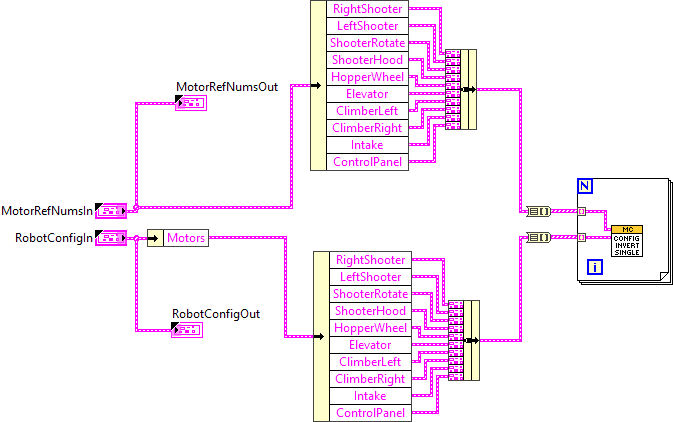
"ConfigInvert.vi History"
Current Revision: 4


